Get your documents ready for AI. Without handing them over.
AI DocPrep turns PDFs, Word docs, decks, and spreadsheets into clean Markdown, reads the text inside scans and screenshots, and redacts the private parts. All on your computer. Nothing gets uploaded.
Other “convert for AI” tools upload your file to their server first.
AI DocPrep doesn't have a server. The work happens on your computer, which keeps the privacy question short. And since the code is open source, you can go read exactly what it does.
Convert, shrink, and scrub. One pass.
Drag, drop, done
Drop in files or whole folders — documents, slides, spreadsheets, email, even images. Click once.
Fully offline
No account, no upload, no analytics. Works exactly the same with Wi‑Fi turned off.
Fewer tokens
Office files carry invisible formatting bloat. AI DocPrep strips it, so models read more and you pay less.
Redaction built in
Emails, SSNs, card numbers, names, API keys: removed before the text goes anywhere.
A messy folder in, clean Markdown out.
Drop your files
Drag any mix of PDFs, Word docs, decks, spreadsheets, web pages, or transcripts onto the window. Folders welcome.
Convert & redact
AI DocPrep parses each file into clean Markdown and, if you want, removes personal details along the way. All on your own processor.
Use it anywhere
Paste into ChatGPT or Claude, drop into your Obsidian vault, or keep the combined master file. It's plain Markdown.
See it run on real files.
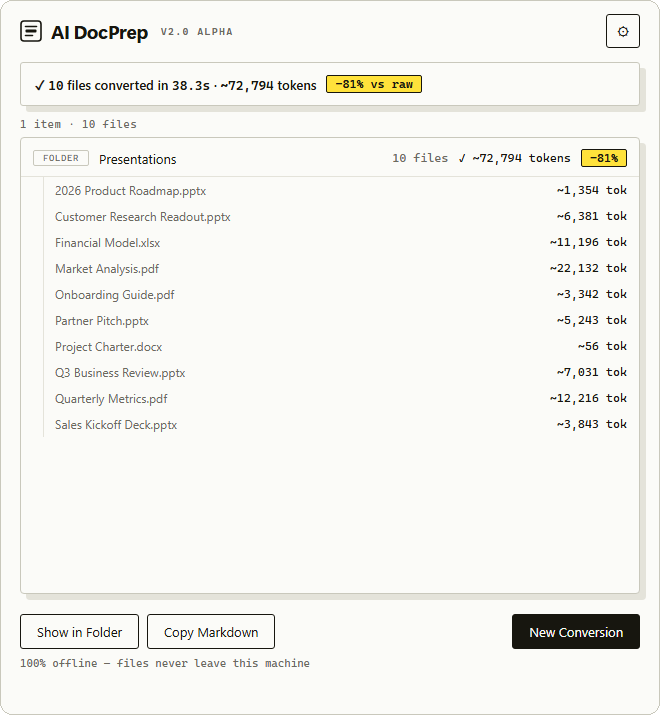
Ten mixed documents — five decks, three PDFs, a spreadsheet, a doc — converted in 38 seconds, fully offline, with the token count and savings shown for every file.
Who it's for.
Ask AI about your medical records. Keep your SSN out of it.
Want a chatbot to explain a lab result or summarize a bank statement? AI DocPrep strips the account numbers, addresses, and IDs first, on your laptop, so you get the help without the exposure.
Read more →Use AI on client documents and keep your duty of confidentiality.
Guidance like ABA Formal Opinion 512 expects lawyers to protect client data before it reaches an AI tool. AI DocPrep redacts privileged details locally. Files stay inside the firm, and no vendor logs a copy.
Read more →Stop paying to send invisible XML to the model.
Raw office files are stuffed with formatting metadata that burns tokens and muddies answers. Convert first and the same document costs a fraction of the context, with structure the model can actually follow.
Turn a folder of documents into linkable Markdown notes.
Bulk-convert PDFs and slides into tidy notes with YAML frontmatter and a generated table of contents. Ready for Obsidian, Notion, or Logseq, and much friendlier to your vault's search and AI plugins.
It runs locally. The code is public. You can check both.
No server involved
AI DocPrep makes no internet requests during conversion. No account, no sync, no telemetry. Turn off Wi‑Fi and run it on a plane; it behaves exactly the same. Your documents stay wherever they already live.
Read the source
The full code is public under the MIT license. You, your IT team, or anyone on the internet can read it, build it, and confirm what it does. A privacy page asks for trust. Source code settles it.
The same document, a fraction of the tokens.
Upload a raw PDF and the model pays for every page image and layout artifact. Convert it first and you send only the words. More of your document fits in the context window, and it costs less to put it there.
Scrub the private parts before anything reaches a chatbot.
Three levels of thoroughness, all local:
- Instant patterns. Emails, phone numbers, SSNs, credit cards, API keys and secrets.
- On-device AI. A bundled model catches names, organizations, and places.
- Local LLM. The deepest, context-aware pass, through your own Ollama server.
Built on Microsoft's MarkItDown engine.
Each format gets a purpose-built converter, so tables, slides, and spreadsheets survive the trip into Markdown. Switch on OCR and it also reads scanned PDFs, screenshots, and the images buried inside your documents — on your machine, like everything else.
Free while it's in beta.
Download it and use it — no account, no trial timer, nothing to pay. Try it on real work and tell me what breaks. If it earns a place in your workflow you can pay what you think it's worth, but that's entirely optional, and the engine stays open source under the MIT license either way.
- Signed on both platforms — no security warnings
- One-click install, no account
- Every feature, nothing held back
macOS (Apple Silicon) and Windows · enter $0 at checkout, or pay what you want · direct download on GitHub
- Full source under the MIT license
- The complete app and command-line tool
- Runs on macOS, Windows, and Linux
Or grab the signed installers on GitHub
Rolling it out at a company? enterprise@aidocprep.app
Fair things to ask before you trust it.
Why not just upload the file straight to ChatGPT?
For a coffee-shop menu, go ahead. But a raw upload sends the whole file, private details included, to a vendor's servers, where it may be retained or used for training. It also wastes context on formatting the model ignores. AI DocPrep sends only clean text, and only the parts you choose to keep.
Is it actually private?
There's no server behind AI DocPrep and no account to sign in to. Conversion makes no internet requests; turn off Wi‑Fi and see for yourself. And because the code is public, your security team can read it instead of taking a policy page's word.
Do I need a vector database or RAG setup?
Usually no. Modern models hold hundreds of pages in context, so for personal and project-sized document sets, one clean Markdown file beats chunked retrieval, with zero infrastructure. If you do run RAG at scale, clean Markdown makes your chunks noticeably more accurate.
Why not use a document-parsing library?
Docling, Marker and PyMuPDF4LLM are good parsers. They're also Python libraries: you install a package, set up an environment, and write code. AI DocPrep is an app. Drag a folder, click once. None of them redact either, so a document with a client name or an SSN in it is still your problem.
Why not use a PII redaction tool?
Most turn a PDF into a redacted PDF. That works for filing a document. It doesn't help when you're pasting into a chatbot, because you're still sending a file full of formatting the model charges you for. AI DocPrep redacts and converts in one pass. Converters don't redact. Redactors don't convert.
Which formats and platforms are supported?
PDF, Word, PowerPoint, Excel, Outlook email (.msg), EPUB, Jupyter notebooks, HTML, VTT transcripts, and image files — on macOS and Windows. With OCR switched on it also reads scanned PDFs and pictures embedded in documents. Conversion runs in parallel across your CPU, and Office temp files are skipped automatically.
What happens to files I've already converted?
Nothing you didn't ask for. AI DocPrep writes new Markdown next to your originals and keeps both by default, so it never overwrites your own notes. When combining a folder, it merges only the files it just converted; an existing Obsidian vault is never swept in.
It's a beta. Tell me what breaks.
A file that converted badly, a name the redactor missed, a step that felt confusing — all of it is useful, and it's the whole reason the beta is free.
no account needed to email · GitHub issues are public